
A closer look at the latest updates to EdgeWise’s integration with AVEVA™ Unified Engineering™ – 3D (formerly AVEVA™ E3D™ Design)
What’s new
Modeling piping for AVEVA E3D Design requires more than tracing what you see in a point cloud. The resulting geometry also requires appropriate specifications and attributes to support downstream engineering workflows.
With the latest release of EdgeWise, piping teams can import their E3D specifications and assign them directly to pipe geometry during modeling. This brings specification mapping into the as-built modeling process, reducing the need to convert primitive geometry into specified piping later in E3D Design.
The result is a more direct path from registered point cloud to specification-aware pipe geometry, with fewer downstream modeling steps.
New to EdgeWise’s AVEVA integration? Start here!
The Details
- Native piping spec support. Import your AVEVA piping specifications into EdgeWise and assign them to pipe chains during modeling.
- More control over individual elements. Use the Part Info Smart Sheet to review and adjust item-level details before export.
- Improved valve and flange workflows. Model valves and flanges as generic objects in EdgeWise, assign AVEVA specifications, and make adjustments in the Part Info Smart Sheet.
- Clearer export status. Color-coded geometry and mapping counts identify spec-mapped and unmapped items. Mapped geometry exports with its specifications; unmapped geometry exports to a separate macro as primitive geometry.
These updates bring piping specification assignment into the modeling process while giving teams greater visibility and control over their models before export to the AVEVA environment
The EdgeWise to E3D Workflow
Load registered point cloud into EdgeWise.

Automatically extract much of the piping and structure using computer vision and pattern-matching algorithms.

QA/QC the extracted elements to ensure accuracy.
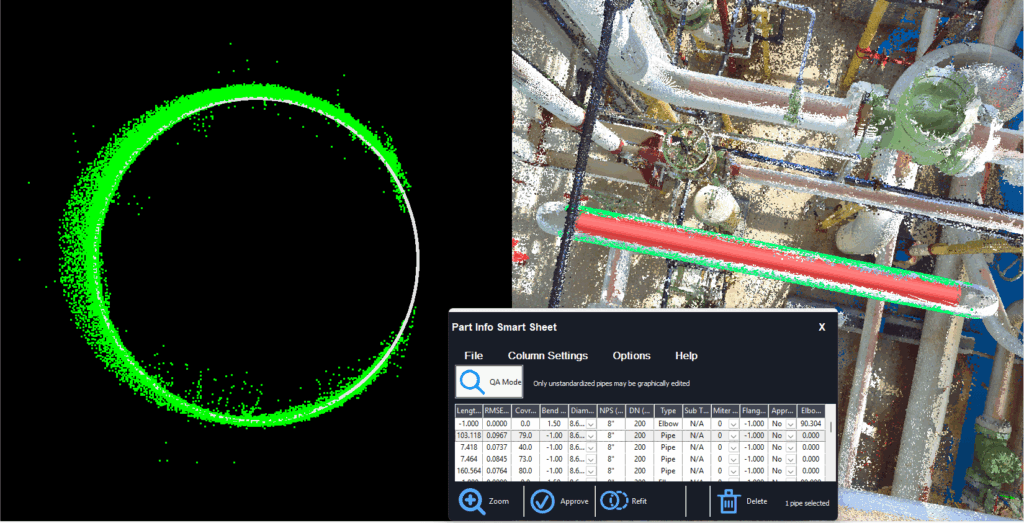
Complete the model using EdgeWise’s semi-automated finishing tools.

Export the model to AVEVA E3D Design using native plug-in to create spec-based, catalogue geometry.
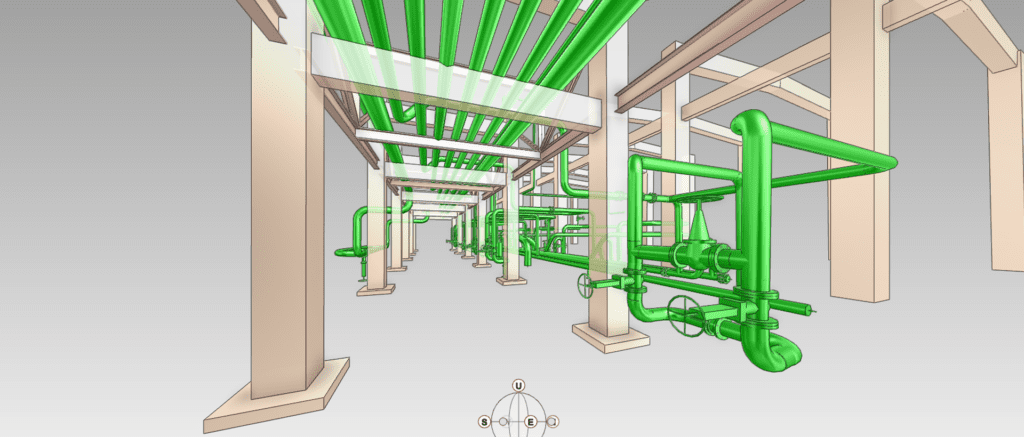
Turn Point Clouds into Intelligent E3D Models
Rapidly create accurate, spec-aware 3D models of piping and structure from your scan data.
From point cloud to intelligent 3D geometry
Start with the specifications defined in your AVEVA environment. Import them into EdgeWise, then extract and refine pipe geometry from your registered point cloud.
The Chain Info Smart Sheet lets you assign specifications to pipe chains and update descriptions across multiple runs. For more granular adjustments, use the Part Info Smart Sheet to review and edit individual elements.
When you’re ready to export, EdgeWise identifies and color-codes spec-mapped and unmapped items. Your team can then choose where to continue the modeling work, with EdgeWise generating a native PML macro for each export path: one for spec-mapped geometry and another for unmapped geometry as primitive objects.
The result is a more integrated workflow for creating as-built pipe models with E3D specification data, without leaving specification mapping until the end of the process.
See the full EdgeWise 5.10.2 release notes.
See what’s possible with EdgeWise and E3D
Ready to see how native piping spec support could fit into your workflow?
Request a demo to explore how EdgeWise turns registered point clouds into specification-aware pipe geometry for AVEVA E3D.